
How to start?
1
Choose a VR camera from the Dreamcam
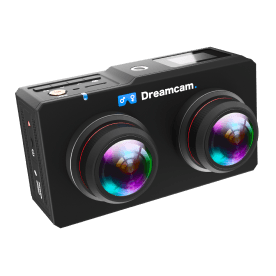
NEW
NANO2
6K
Image Resolution
5760 * 2880 at 50 fps
4096 * 2048 at 50 fps
Encoding
H.265/H.264 codec
Cooling
Active
Auto Gain/Auto WB
Brightness correction
for auto mode
for auto mode
Anti-flicker
Settings Panel
Memory Card Type
SD
Video and Photo Recording
Gyroscope
Size
13.5 cm * 7.5 cm * 7.5 cm
Weight
700 grams
Connection to PC
USB
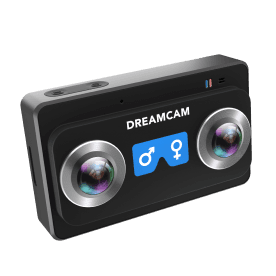
OUT OF STOCK
NANO1
4K
Image Resolution
3840 * 2000 at 50 fps
Encoding
H.264 codec
Cooling
Passive
Auto Gain/Auto WB
Brightness correction
for auto mode
for auto mode
Anti-flicker
Settings Panel
Memory Card Type
SD
Video and Photo Recording
Gyroscope
Size
10 cm * 6.3 cm * 3.5 cm
Weight
200 grams
Connection to PC
USB

Computer
NANO2
6K
Operating SystemWindows
HOME 10/11
HOME 10/11
ProcessorIntel i5-9600T,
Intel i7-6700
or AMD Ryzen 5
2400 or higher
Intel i7-6700
or AMD Ryzen 5
2400 or higher
Graphics CardNvidia GTX 1050,
Nvidia GTX 1650,
Nvidia RTX 2050,
and higher.
BETA: AMD graphics cards
from RX 5500 XT
and higher
Nvidia GTX 1650,
Nvidia RTX 2050,
and higher.
BETA: AMD graphics cards
from RX 5500 XT
and higher
Nvidia graphics cards
below the 10th generation
are not supported
below the 10th generation
are not supported
RAM2х4GB DDR4
2400 MHz
MacOS2400 MHz
Operating SystemMac OS Ventura
from 13.6.6
from 13.6.6
ProcessorM1 Pro 8GB RAM
M2 8GB RAM
M2 8GB RAM
NANO1
4K
Operating SystemWindows
HOME 10/11
HOME 10/11
ProcessorIntel i5-9600T,
Intel i7-6700
or AMD Ryzen 5 2400
or higher
Intel i7-6700
or AMD Ryzen 5 2400
or higher
Graphics CardNVIDIA GTX 950+,
1050+ or higher
1050+ or higher
AMD graphics cards
are not supported
are not supported
RAM2х4GB DDR4
2400 MHz
MacOS2400 MHz
Not supported

Room
Camera working distance: 1-3 meters
Camera working area: 15 m^2
Working space: light-colored smooth walls w/o moire patterns
Preferred camera position: eye level

Internet
Internet Minimal speed of connection: 100Mbs
2
123123
3
Connect the camera to your computer and install the VR
Download software
4
СКРЫТАЯ ИНСТРУКЦИЯ
5
test

How do I go online?
1
Fill out the profile on
models.dreamcamtrue.com
2
How to customize a picture in VR
3
Start streaming in VR
ASDD
1
ASDD
2
ggg
6
ModelsGuide
7
qwdqwdqdqd
8
q
1
q2
2
q1